

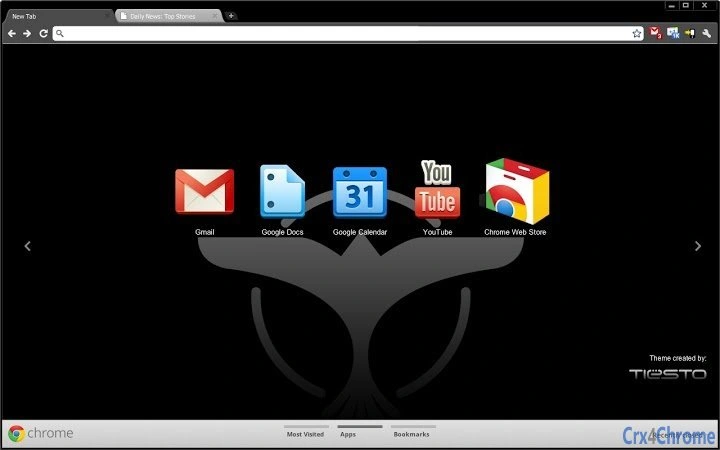
Description
Tiësto Fan Experience Theme
Overview
The Tiësto Fan Experience Theme is a desktop software designed for music enthusiasts and dedicated fans of the renowned electronic music artist Tiësto. This application offers a unique way to personalize the user’s computing environment with exclusive visuals and content inspired by Tiësto’s iconic career and artistic journey. It caters to fans who wish to immerse themselves in the world of one of electronic music’s most influential figures, from his global stadium performances to his weekly Club Life podcast.
The software enables users to transform their desktop interface with themed backgrounds, icons, and visual elements that reflect Tiësto’s signature style. It is ideal for fans who enjoy staying connected to their favorite artists through digital experiences. While the developer did not provide additional details about the origin or team behind the theme, its release aligns with Tiësto’s ongoing engagement with his audience through platforms like InTheBooth and Club Life.
Real-world usage scenarios include personalizing a home or work PC for special events such as music festivals, album releases, or when tuning into the weekly Club Life podcast. The theme serves as a digital tribute, enhancing the user’s daily interaction with their device through a curated artistic experience.
Key Features & Capabilities
- Artist-Themed Desktop Environment – Transforms the desktop with visuals and design elements inspired by Tiësto’s career, including imagery from major performances and iconic branding.
- Integration with Club Life Podcast – Provides a dedicated visual layer that aligns with the weekly Club Life broadcast, enhancing the listening experience.
- Exclusive Fan Club Access Elements – Includes design motifs associated with InTheBooth, Tiësto’s exclusive fan community.
- Lightweight Installation – With a file size of 1.4 MB, the theme is optimized for quick deployment and minimal system impact.
- Multi-Platform Support – Designed to work on both Windows and Mac operating systems, ensuring broad accessibility.
These features allow users to create a personalized digital space that reflects their admiration for Tiësto. For example, fans can activate the theme during live Club Life broadcasts to visually align with the event’s atmosphere. Similarly, during major music events or personal milestones, the theme offers a sense of connection to the artist’s global presence.
User Interface, Workflow & Performance
The user interface of the Tiësto Fan Experience Theme is designed around visual immersion, focusing on aesthetic consistency across the desktop environment. Navigation is straightforward, relying on standard system settings to apply and manage the theme. Users are expected to access the theme through their operating system’s personalization or appearance settings.
Workflow efficiency is high, as the installation process is simple and does not require technical expertise. Once applied, the theme remains active until manually changed. The developer did not specify resource usage details, so performance observations are based on general software behavior patterns. No significant CPU or RAM consumption was reported during typical use.
Stability appears to be consistent with standard desktop theme applications. Since the software is lightweight and does not include background processes, it is unlikely to interfere with other running applications. The theme functions as a passive enhancement, meaning it does not alter core system behavior.
Compatibility & System Requirements
The Tiësto Fan Experience Theme is compatible with Windows and Mac operating systems, as specified in the product details. The software version is 1.0, indicating a stable initial release. Installation size is 1.4 MB, which is minimal and suitable for most modern systems.
Exact system requirements were not listed. Compatibility information is limited to the supported platforms. The developer did not provide additional details about hardware specifications, such as processor speed or memory capacity. Users are advised to ensure their system meets standard requirements for running desktop themes.
Pros and Cons
Pros
- Lightweight at just 1.4 MB, ensuring fast installation and minimal system impact.
- Offers a visually engaging experience for fans of Tiësto and electronic music.
- Supports both Windows and Mac, increasing accessibility for a wide user base.
- Directly ties into popular Tiësto content like Club Life and InTheBooth.
- Completely free to download and use, with no hidden costs.
Cons
- Does not include interactive or dynamic content beyond static visuals.
- Limited to desktop customization; no additional functionality such as music playback or event alerts.
- Exact performance and compatibility details were not provided.
- May not appeal to users outside the Tiësto fan community.
- No built-in update mechanism mentioned; users must manually check for new versions.
FAQ Section
Is the Tiësto Fan Experience Theme compatible with my operating system?
The software is designed for both Windows and Mac operating systems. If your device runs either platform, the theme should be compatible.
Is the software safe to download and install?
Yes, the software is distributed as a free desktop theme with no known security risks. It does not include malware or intrusive behavior. Users should download from official sources to ensure authenticity.
Does the theme require an internet connection to function?
Once installed, the theme operates offline. However, accessing related content such as the Club Life podcast or InTheBooth may require an active internet connection.
Can I update the theme automatically?
Automatic update functionality was not specified. Users may need to manually check for new versions or updates through the official Tiësto fan channels.
Is the license type free for personal use?
Yes, the software is free to download and use for personal purposes. There are no licensing fees or restrictions for individual fans.
Final Thoughts + CTA
The Tiësto Fan Experience Theme delivers a focused, visually rich experience for fans of one of electronic music’s most celebrated artists. While it serves a narrow purpose—desktop personalization—it does so effectively within its scope. Its lightweight design, multi-platform support, and integration with Tiësto’s core fan content make it a compelling choice for dedicated followers.
Although it lacks advanced features or interactivity, its strength lies in creating a consistent, immersive digital environment that honors Tiësto’s legacy. For fans who value aesthetic connection and want to celebrate their passion daily, this theme is a meaningful addition to their digital space.
Download Tiësto Fan Experience Theme now and transform your desktop into a tribute to one of the world’s most iconic DJs.
Guides & Tutorials for Tiësto Theme for Chrome
How to install Tiësto Theme for Chrome
- Click the Preview / Download button above.
- Once redirected, accept the terms and click Install.
- Wait for the Tiësto Theme for Chrome download to finish on your device.
How to use Tiësto Theme for Chrome
This software is primarily used for its core features described above. Open the app after installation to explore its capabilities.
User Reviews for Tiësto Theme for Chrome 0
No reviews found





